Freetrack and RMPD: how to connect a Freetrack tracker to trip tracking
Freetrack and RMPD work together like this: the Freetrack tracker connects to your Moisa Logistics account with a user token, and its points appear on the “Fleet map” and next to RMPD tracking. The tracker does not become a locator for RMPD or SENT - the notification needs the number of the e-TOLL PL app, an OBU or a ZSL device. Below: four steps in gps.freetrack.ua, what you will see in the account and the usual mistakes.
 Moisa Logistics··8 min read
Key figures
In short: what connecting Freetrack gives you
A Freetrack tracker connects to your Moisa Logistics account in a few minutes: in gps.freetrack.ua you create a separate user, give it access to the vehicles and copy its token, and in the account you paste the token into the “Access key” field. We only see the list of vehicles and their coordinates and change nothing in Freetrack. This does not give you a number for the RMPD: that comes from the e-TOLL PL app, an OBU or a ZSL device of an operator registered in e-TOLL.
- Where Freetrack shows up: on the “Fleet map” (all vehicles with a tracker - on a trip and off it) and in the tracking block of an order with an RMPD.
- What the dispatcher gains: you see whether the truck is really stopped while PUESC is silent, and where it drove without positions in PUESC.
- What it does not do: it sends no positions to PUESC and does not replace the locator in an RMPD or SENT.
- Who connects it: the company owner, under Profile → “Integrations” → “GPS trackers”.
Freetrack and RMPD: why a tracker is not yet a locator
An RMPD must state the locator number or the device number (Art. 28b(3)(12) of the Polish Road Transport Act), and positions from that device must reach PUESC along the whole route in Poland (Art. 28b(5)). The SENT Act knows two ways: a locator - in practice the e-TOLL PL app on the driver’s phone - and an external location system (ZSL), a device fitted permanently in the vehicle by a ZSL operator. There is also the OBU on-board unit, which can be moved between vehicles. Only its operator registers an OBU or ZSL in PUESC - for e-TOLL, for SENT or for both (PUESC FAQ 07.05).
The tracker sends points to Freetrack, Freetrack sends them to our account, but not to PUESC. So a fleet tracker that its operator has not registered in SENT does not exist for a geolocation check, however precisely it shows the truck to your dispatcher. Three real cases with such trackers are in the article car transporters and GPS fines in Poland. Before the trip, check two things:
- Whether your provider is a ZSL operator. Ask them, or find them on the official list of OBU/ZSL operators and devices admitted to e-TOLL at etoll.gov.pl - the “OBU and ELS on-board devices” section (version of 06.11.2026).
- Whether your own device is registered for SENT and not only for e-TOLL: a device registered only for e-TOLL pays the tolls but gives no positions in RMPD 406 (FAQ 07.15). The business number of an operator’s device starts with Z or U.
What the number looks like and how to set up a main and a backup locator is explained in the article GPS locator for RMPD and SENT. Which other systems connect to the account and how a fleet tracker differs from a locator is covered in the overview GPS tracker for RMPD and SENT.
Freetrack and SENT
SENT follows the same rule: positions come from e-TOLL PL, an OBU or a ZSL registered in the SENT service, and as a backup SENT accepts only the app’s mobile number. On its website Freetrack offers separate services that pass data to e-TOLL and SENT. If you have such a service, that service gives you the number for the notification - confirm it with Freetrack. Connecting Freetrack to your Moisa Logistics account does not affect SENT and sends nothing to SENT.
What Freetrack shows in your Moisa Logistics account
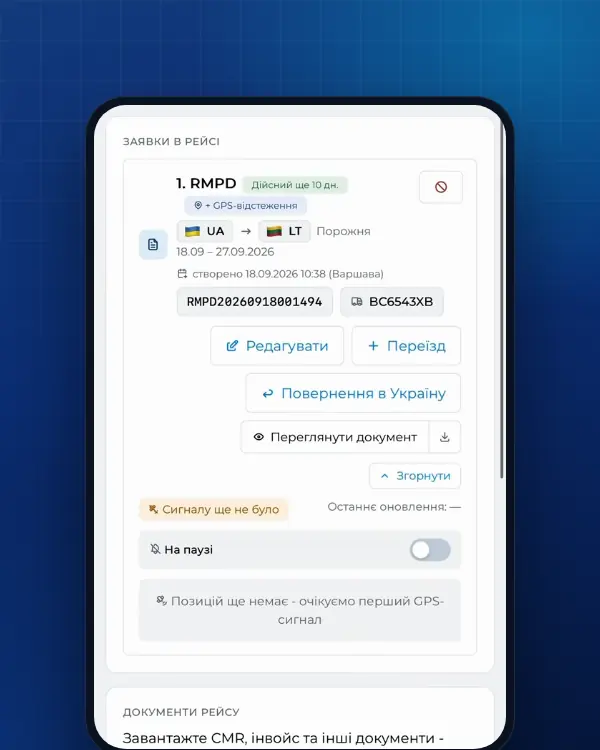
RMPD tracking in the account takes positions from PUESC. The Freetrack tracker adds a second picture - what your tracker sees at the same time:
| Where | What you see | What it means |
|---|---|---|
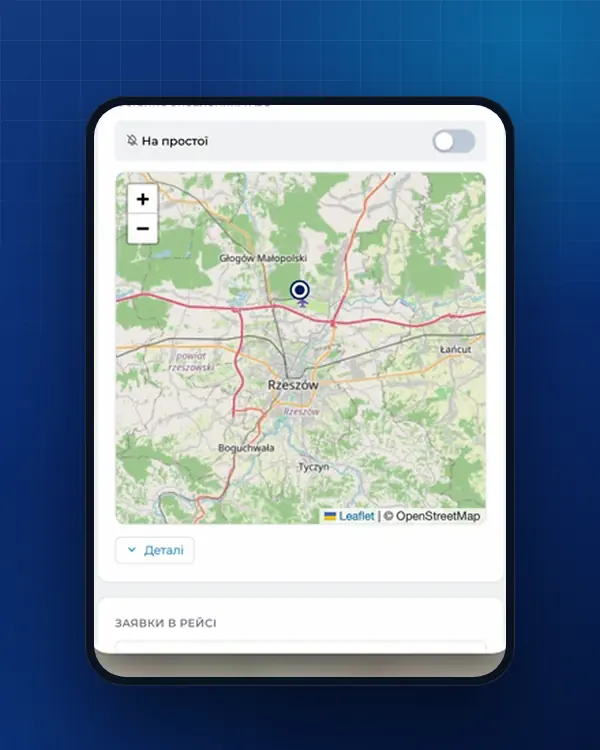
| “Fleet map” | All vehicles with a Freetrack tracker: on a trip - with the order number and the route driven, off a trip - the location from the tracker; next to each - the time of the last point | You see the whole fleet, not only the vehicles with an RMPD |
| Tracking of an order with an RMPD | A dashed line - the Freetrack tracker’s route during the order, next to the PUESC line | Where there is a dashed line but no PUESC line, the vehicle was moving while the PUESC locator was silent |
| PUESC is silent, the tracker is stopped | The status “Stopped · per tracker” | A pause, not a signal loss: we do not send an alert; when the vehicle moves, we check again |
| PUESC is silent, the tracker is moving | The status “Fine risk” and an alert | Check the locator or the driver’s app while the trip is still under way |
Tracker data refreshes every 5 minutes. We are not a government service and only show tracking data from PUESC: if the connection drops, the cause is the locator, the driver’s app or the mobile operator, and it is found on the spot. What to do when the signal is lost is covered in the article RMPD 406: GPS signal lost.
Example: a trip via Yahodyn - Dorohusk
Truck AA1234BB has a Freetrack tracker, and the main locator in its RMPD is the e-TOLL PL app on the driver’s phone (the number is made up). After Dorohusk, positions go to PUESC, and the order shows two lines: PUESC and the dashed Freetrack line.
- Parked. The driver is in a car park and PUESC gets no positions for a while. Freetrack shows the truck is stopped - status “Stopped · per tracker”, no alert.
- Moving without positions. Near Lublin the phone battery dies: PUESC is silent, while Freetrack sees movement. The account sets “Fine risk” and sends an alert, and the dispatcher calls the driver straight away.
- Over an hour. If the locator is down for more than an hour, the driver must stop at the nearest parking place (Art. 10c of the SENT Act), and the carrier faces 10,000 zł for missing geolocation in the RMPD.
Without the tracker, in the first two cases the account would see the same PUESC silence. With the tracker you can tell whether the truck is really stopped.
How to connect Freetrack: 4 steps in gps.freetrack.ua
The company owner does the connecting. First, in Freetrack:
- Sign in to gps.freetrack.ua as the company manager.
- Menu → “Users” → create a separate user for Moisa.
- Give this user access to the vehicles that should be on our map. Without it Freetrack returns an empty list.
- The menu next to the user’s name → “Copy user token”. You can also copy the whole auto-login link - the account picks the token out of it.
Then, in your Moisa Logistics account:
- Open Profile → the “Integrations” tab → the “GPS trackers” section.
- Pick the Freetrack tile among the GPS providers, or the system directly - “Freetrack, gps.freetrack.ua”. The “Step-by-step guide” button opens these same steps.
- Paste the token into the “Access key” field and click “Check and connect”.
If right after an attempt the account says “Try again in N min”, wait those minutes and repeat. The “GPS trackers” section (Profile → “Integrations”) is in every company’s account, and the company owner does the connecting.
After connecting: vehicles, plates, disconnecting
Vehicles from Freetrack are matched to your fleet by licence plate on their own. The connection card shows “Trackers: N, matched to vehicles: M”. Whatever was not matched, pick in the tracker list under the card: a vehicle from the fleet or “Not from the fleet”. A new truck appears on the map once the Moisa user in Freetrack gets access to it as well.
To disconnect, click “Disconnect”: we delete the access on our side, and the trackers disappear from the fleet map. Delete the Moisa user itself in Freetrack.
Common mistakes
| What you see | What to check |
|---|---|
| “The GPS system returned no vehicles” | Whether the Moisa user in Freetrack has access to the vehicles. Grant access and connect again |
| “The system does not accept this key” | Whether the token was copied in full and whether the user it belongs to still exists |
| “Try again in N min” | Wait the minutes shown and repeat |
| The account is already connected to another company | The same Freetrack login is already used by another company in Moisa Logistics - write to support |
| The vehicle is in Freetrack but not on the map | The plate in Freetrack is written differently from the fleet: pick the vehicle manually in the tracker list |
| The tracker is on the map, but RMPD 406 shows no positions | The tracker is not registered in SENT, or the RMPD carries another number: check the locator number and, if needed, enter e-TOLL PL with an RMPD 101 correction |
RMPD tracking at Moisa Logistics: price
- Trip tracking is included in the RMPD price: full service - 500 UAH per document, self-service in the account - 100 UAH (the first 10 days - 0 UAH).
- RMPD 406 - 50 UAH for an RMPD made elsewhere: a route map from PUESC data and an alert when GPS disappears.
Order: RMPD full service, RMPD self-service, RMPD 406. How to read the tracking statuses is explained in the article why RMPD 406 and trip tracking.
Frequently asked questions
Sources
- Ustawa z dnia 6 września 2001 r. o transporcie drogowym, tekst jednolity Dz.U. 2025 poz. 1490 (art. 28, 28b, 28c, 89a1, załączniki nr 1 i 3)checked 21 November 2026
- Ustawa o systemie monitorowania drogowego i kolejowego przewozu towarów (SENT), tekst jednolity Dz.U. 2024 poz. 1218: art. 2, 3 ust. 6, 5-11, 13-17, 21-24, 31-32 (dla RMPD - przez art. 28b ust. 5 ustawy o transporcie drogowym)checked 21 November 2026
- PUESC - FAQ SENT, 07. Obsługa zewnętrznych systemów lokalizacji ZSL/OBU (07.05-07.20, aplikacja e-TOLL PL jako lokalizator zapasowy)checked 21 November 2026
- PUESC - schemat XSD systemu SENT (STypes.xsd): numer referencyjny SENT + 14 cyfr, klucz przewoźnika KD-, numer lokalizatorachecked 21 November 2026
- e-TOLL - Urządzenia pokładowe OBU i ZSLchecked 21 November 2026
- e-TOLL - Lista Operatorów i urządzeń OBU/ZSL dopuszczonych do systemu e-TOLL (wersja z 06.11.2026)checked 21 November 2026
- e-TOLL - Aplikacja mobilna e-TOLL PL: instrukcja korzystania dla przejazdów SENT/RMPD (identyfikator biznesowy, Przejazd SENT/RMPD, Lokalizacja GPS SENT/RMPD 406, status baterii i GPS)checked 21 November 2026
- FreeTrack - система GPS-моніторингу транспорту в Україні: вхід на сервер gps.freetrack.ua, послуги передачі даних у e-TOLL і SENTchecked 21 November 2026
Need documents for a trip?
Create a free account and prepare the document in your account - by yourself or with our team’s hands. Or leave a request: we will call you and tell you what you need for your particular trip.
More news

We are on TikTok
How to prepare documents from your phone, what is changing for carriers and where to save - in short videos.